One of the biggest concerns corporate teams face when discussing digital compliance is the fear of a total visual overhaul. There is a common assumption that making a website accessible means scrapping the existing user interface, throwing away weeks of design work, and spending a small fortune on a complete rebuild.
But digital compliance isn’t about altering your brand’s aesthetic identity; it is about cleaning up the underlying technical architecture. According to the 2026 WebAIM Million Report, a striking 95.9% of the top 1 million homepages still fail basic WCAG compliance standards. Pair that with the fact that over 5,000 digital accessibility lawsuits were filed in federal and state courts in 2025 alone (UsableNet), and it becomes crystal clear that fixing these gaps is an operational priority.
The good news? You do not need a costly, time-consuming website redesign to achieve compliance, protect your business from litigation, and provide a stellar user experience. By focusing on targeted, high-impact source code remediation, you can achieve web accessibility on your existing framework.
What Is Web Accessibility (A11y)?
If you are new to the concept, web accessibility, often abbreviated as A11y (because there are 11 letters between the ‘A’ and the ‘y’), simply means ensuring your digital content can be used by everyone. This includes people with visual, auditory, motor, or cognitive impairments.
When a website is accessible, a person who is blind can navigate it using a screen reader (software that reads page text aloud). A user with physical limitations can navigate using only a keyboard instead of a mouse. By focusing on the structural layer of your site, you make it compatible with these assistive technologies without changing the visual style that your customers love.
According to data compiled by industry analysts at ASSIST Software, just six common, under-the-hood errors account for 96.4% of all web accessibility issues. These aren’t stylistic choices; they are structural flaws. By isolating these six issues, you can preserve your brand’s aesthetic while radically improving usability. To systematically address these issues without an overhaul, organizations frequently partner with specialized digital compliance firms like Tranistics to execute precise source-code fixes that preserve core layouts.
5 Practical Fixes to Implement on Your Current Site Today
-
Adjust Your Color Contrast (Without Changing Your Palette)
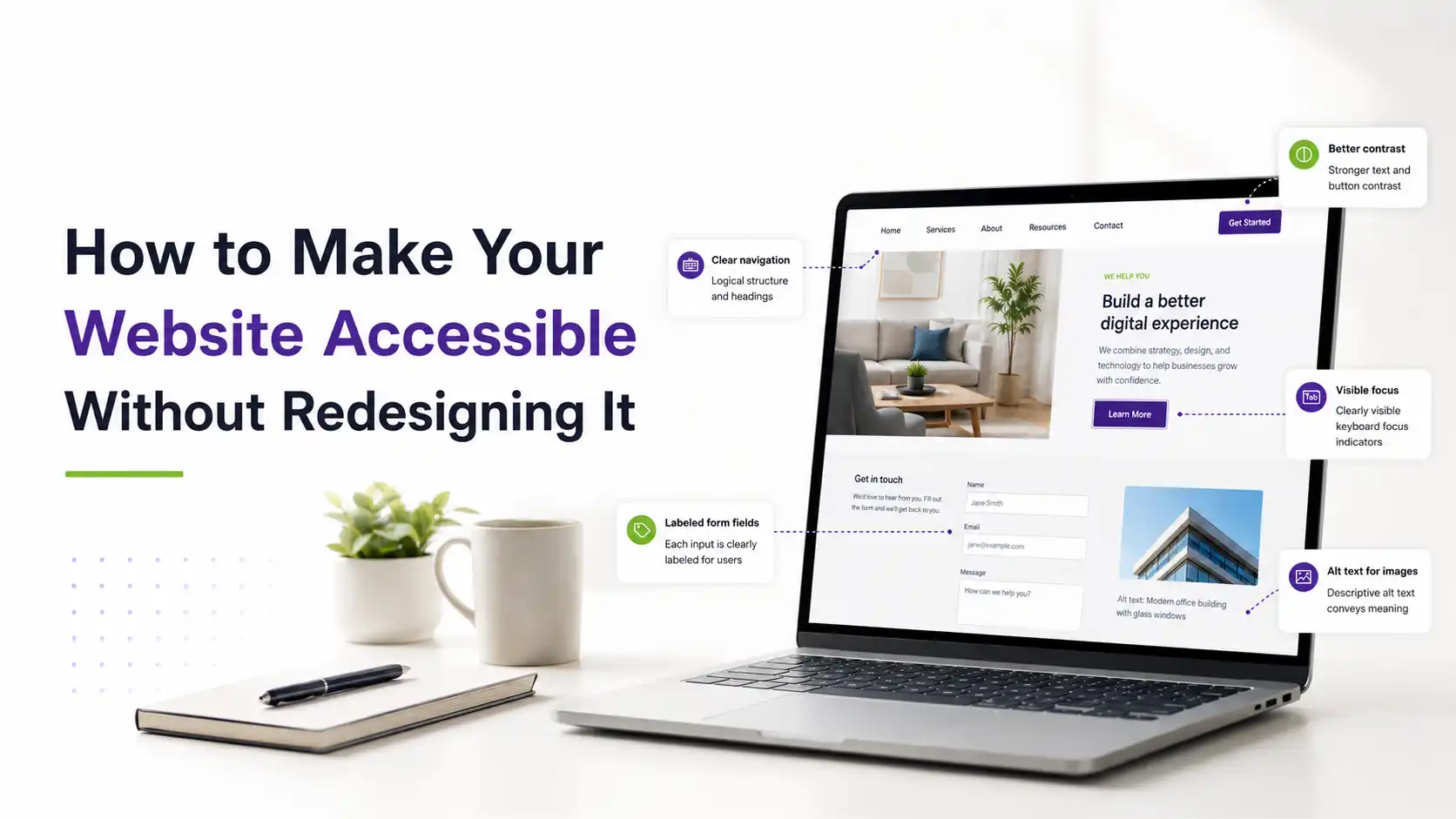
Low-contrast text remains the number-one WCAG violation on the internet, affecting 83.9% of homepages.
- The Concept: If your text color is too close to your background color (like light gray text on a white background), it becomes unreadable for visually impaired individuals or anyone viewing their screen in bright sunlight.
- The Quick Fix: You rarely need to change your primary brand colors. Often, bumping a text color down a few shades closer to dark charcoal or black preserves the design intent while hitting the mandatory 4.5:1 contrast ratio required for standard text under WCAG guidelines.
-
Add Clear Alternative Text (Alt Text) for Images
Images enrich your website, but for a user relying on a screen reader, a missing alt attribute turns an image into a frustrating, silent roadblock. WebAIM’s latest data shows that 16.2% of all homepage images lack alternative text entirely.
- The Concept: Alt text is a short text description embedded in your website’s code that tells a screen reader exactly what an image contains.
- The Quick Fix: Audit your media library. For every informative image, write a brief, descriptive sentence. If an image is purely decorative (like a background geometric shape), explicitly mark it as alt=”” so screen readers know to skip it gracefully.
-
Label Your Form Fields Correctly
If a user cannot navigate your contact forms, checkout funnels, or login screens, your website fails at a business level. Nearly half of all commercial websites (48.6%) feature unlabelled or improperly grouped form elements.
- The Concept: A blind user tabbing through a form needs to know what information to type into a blank box. Without proper labels, the screen reader just announces “Edit text box,” leaving the user guessing.
- The Quick Fix: Ensure every form field (<input>) is paired with an explicit <label> tag using the for attribute in the code. This links the visual label directly to the text field so assistive hardware can read it aloud.
HTML
<!– Correct Code Structure –>
<label for=”user-email”>Email Address</label>
<input type=”email” id=”user-email” name=”email”>
-
Build a Logical Heading Structure
Screen reader users navigate a page much like a sighted user skims a blog post: by jumping from headline to headline. Shockingly, 41.8% of websites skip heading levels (for example, jumping from an <h1> directly to an <h4> because of how a developer styled the fonts).
- The Concept: Headings act as the table of contents for a webpage. They must follow a clean, nesting order.
- The Quick Fix: Organize your headings strictly by importance, from <h1> for the main page title, down through <h2> for major sections, and <h3> for subsections. If you need a headline to look smaller visually, change its appearance using your CSS stylesheet, not by using an incorrect HTML tag.
-
Repair Empty Links and Buttons
An empty link occurs when an interactive icon (like a social media symbol) or an image is turned into a link without any actual text inside the code. Sighted users see a Facebook icon; a screen reader user simply hears the word “Link.”
- The Quick Fix: Add descriptive text inside the link or use an aria-label attribute on the element. For instance, <a href=”#” aria-label=”Follow us on LinkedIn”> gives immediate context without altering your frontend visual layout.
Beware the Shortcut: The Hidden Risks of Accessibility Widgets
When organizations realize they face legal liability, they often turn to quick, automated fixes like JavaScript-based overlay widgets or plugin panels that float on the side of the page.
Data from the 2025–2026 EcomBack ADA Website Accessibility Lawsuits Annual Report reveals that 24.9% of all web accessibility lawsuits targeted websites that already had accessibility widgets or overlays active.
|
Remediation Approach |
Legal Protection Level | Actual User Experience |
|
Automated Overlays & Widgets |
Low Protection (Targeted by Plaintiffs) |
High Friction / Often Blocks Screen Readers |
| Source Code Remediation | High Protection (Fixes Root Issues) |
Smooth, Seamless Navigation |
Why do these temporary widgets fail? Because they act as a superficial band-aid. They sit on top of your site, attempting to patch code on the fly, which frequently conflicts with physical screen readers and keyboard navigation setups. True compliance happens directly in your Content Management System (CMS) or your core code architecture.
Organizing a Sustainable Accessibility Plan
Making your existing website compliant without a redesign requires a phased, data-backed approach. You don’t have to fix all 500 pages overnight; you simply need to prioritize the paths where your users experience the most friction.
- Map Your Critical Journeys: Focus initial attention on high-traffic locations—the homepage, product or service landing pages, contact forms, and payment flows.
- Conduct a Hybrid Audit: Combine automated scanning tools (which catch roughly 30-40% of programmatic errors) with human manual testing to understand how a user actually interacts with your platform.
- Remediate in Sprints: Group your fixes by category. Spend one week updating missing alt text, the next fixing form elements, and the third adjusting color contrast.
By taking this measured approach, you completely bypass the disruption, overhead, and organizational stress of a creative redesign. You don’t need a brand-new website; you simply need cleaner, more inclusive code.
To ensure your existing digital infrastructure meets strict modern standards without risking broken layouts, consider collaborating with the engineering teams at Tranistics to seamlessly integrate sustainable accessibility compliance into your current digital footprint.